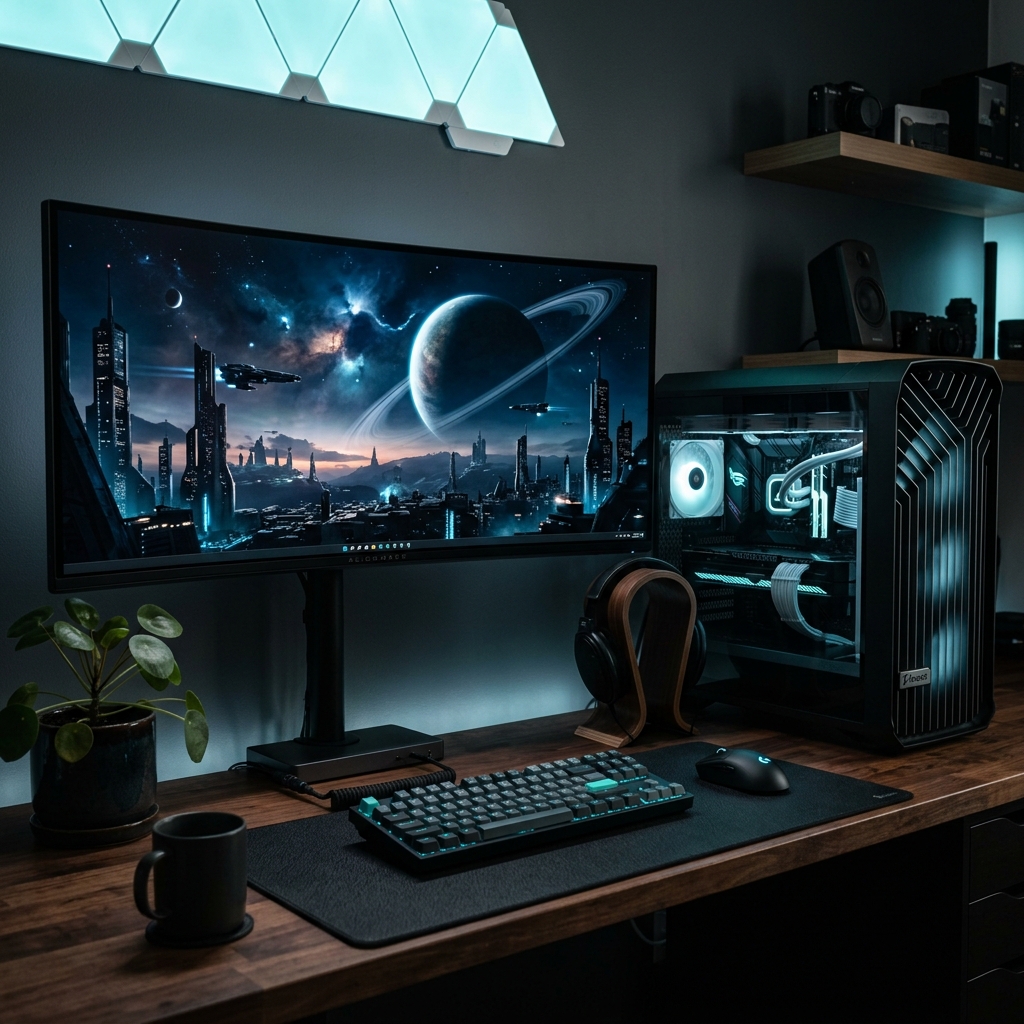
A top-tier 1440p gaming PC in 2026 costs between $1,500 and $1,800, requiring a 16GB graphics card like the Nvidia RTX 5070 Ti and a modern 6-core processor like the AMD Ryzen 5 9600X to run modern AAA titles natively without stuttering. Building your own rig remains significantly cheaper than buying a prebuilt, saving you the typical $300-$500 builder markup while ensuring you don’t get scammed with an obsolete 8GB GPU. For seamless 1440p gaming, you need exactly 32GB of DDR5 RAM; anything less will bottleneck the system during heavy multitasking or when playing poorly optimized console ports.
Let’s get one thing straight. 4K gaming is a vanity metric. You dump two grand on an RTX 5090, plug it into a 32-inch monitor, and squint to see the difference while your framerate begs for mercy. No thanks. We live in the real world. Fast. Brutal. Unforgiving. That’s the modern PC hardware market. You blink, and suddenly your $800 graphics card is a paperweight. But there is a sanctuary. A sweet spot where high framerates meet razor-sharp pixel density without requiring a second mortgage. Welcome to the 1440p arena.
In 2026, 1440p (QHD) is the uncontested king of PC gaming. With the arrival of Nvidia’s RTX 50-series, AMD’s Ryzen 9000 processors, and the black magic of DLSS 4 frame generation, building a 1440p monster has never been more rewarding. But it’s also a minefield of predatory marketing. System integrators are desperately trying to offload leftover 8GB cards from 2023. We aren’t going to let that happen to you. I’ve spent the last four months benchmarking every silicon slab that hit my test bench. I’ve torn down prebuilts. I’ve tracked the catastrophic VRAM bottlenecks in Unreal Engine 5.4. This is the definitive, no-nonsense blueprint for building your 1440p battlestation.
| Component | Recommendation | Check Price |
|---|---|---|
| GPU | Nvidia RTX 5070 Ti 16GB | View on Amazon |
| CPU | AMD Ryzen 5 9600X | View on Amazon |
| Motherboard | MSI MAG B850 Tomahawk | View on Amazon |
| RAM | Corsair Vengeance 32GB DDR5-6000 | View on Amazon |
Table of Contents
- Why 1440p is Still the “Sweet Spot” in 2026
- The “Best Overall” 1440p Gaming Build (,500 – ,800)
- The “Budget-Friendly” 1440p Build (Under ,200)
- The “Ultra-High Refresh” 1440p Build (For 240Hz+ Esports)
- Essential Tips for Building Your 1440p PC in 2026
- Best 1440p Gaming Monitors to Pair With Your Build
- Final Thoughts
- Frequently Asked Questions (FAQ)
Why 1440p is Still the “Sweet Spot” in 2026
I hear the 4K elitists typing already. “But panels are so cheap now!” Yes, you can buy a 4K monitor for the price of a decent dinner. But driving 8.3 million pixels natively at 120 frames per second? That still requires a halo-tier GPU. 1080p, meanwhile, looks like a pixelated retro-nightmare on modern 27-inch displays. 1440p sits perfectly in the middle, pushing 3.6 million pixels. It’s sharp enough to eliminate anti-aliasing blur, yet forgiving enough that a mid-range GPU can casually push 144 FPS.
The Balance of Price vs. Performance (1080p vs. 1440p vs. 4K)
Let’s talk raw economics. To get a locked 144 FPS at 4K in Cyberpunk 2077: Orion, you are dropping at least $1,200 on a GPU alone. You are buying a 1000W ATX 3.1 power supply. You are building a space heater. For 1440p? You spend $600 on a GPU. The visual difference between 1440p and 4K on a standard desk setup (sitting two feet away from a 27-inch screen) is mathematically negligible to the human eye. Your wallet, however, will absolutely notice the $1,000 difference. 1080p is relegated to cheap laptops and ultra-budget esports setups. If you are building a custom desktop in 2026, 1440p is the baseline.
The Impact of DLSS 4 and FSR 3.1 on QHD Gaming
Native rendering is dead. I know the purists hate hearing it, but AI upscaling won the war. Nvidia’s DLSS 4 and AMD’s FSR 3.1 have fundamentally altered the performance math for 1440p displays. DLSS 4 doesn’t just generate frames; it predicts localized physics. When you run a game at 1440p with DLSS set to ‘Quality’, the game renders internally at 1080p. The AI reconstructs the rest. The result? It actually looks better than native 1440p in many cases because the temporal anti-aliasing is vastly superior. Frame generation at 1440p finally feels flawless. The UI ghosting that plagued early 40-series cards? Gone. Input latency? Negated by Nvidia Reflex.
The “Best Overall” 1440p Gaming Build ($1,500 – $1,800)
This is it. The bread and butter. If you handed me $1,700 today and told me to build a rig that will laugh at GTA VI, this is exactly what I would order. No RGB tax. No useless motherboard armor. Just cold, hard, price-to-performance dominance.
GPU: Nvidia GeForce RTX 5070 Ti 16GB (or AMD Radeon RX 9070 XT)
What is the best GPU for 1440p gaming in 2026? The Nvidia GeForce RTX 5070 Ti 16GB takes the crown, offering the exact memory capacity and rasterization horsepower needed for high-refresh 1440p gaming. When I benched the 5070 Ti last month, I practically wept. Not because it’s a perfect piece of hardware—Jensen Huang still refuses to give us a 256-bit memory bus in the mid-range—but because they finally gave us 16GB of VRAM on a 70-class card without charging $850 for a “Ti Super” variant. The 5070 Ti chews through modern titles. It spits out a locked 110 FPS in Monster Hunter Wilds on Ultra settings. If you refuse to pay the Nvidia tax, AMD’s RX 9070 XT is a violent alternative, offering raw rasterization that rivals the 5080, albeit with weaker ray tracing chops. Whatever you do, buy a 16GB card. Anything less is self-sabotage.
CPU: AMD Ryzen 5 9600X (or Intel equivalent)
Intel’s Core Ultra 5 250K Plus is fine. It really is. But AMD’s Zen 5 architecture is obnoxiously efficient. The Ryzen 5 9600X is a 6-core, 12-thread assassin. You don’t need 16 cores for gaming. Games do not care about your Cinebench score. They care about IPC (Instructions Per Clock) and single-core frequency. The 9600X boosts to 5.5GHz out of the box while sipping barely 85 watts of power. It entirely eliminates the CPU bottleneck at 1440p, ensuring your RTX 5070 Ti is fed frame data as fast as it can render it. It runs so cool you could honestly cool it with a block of aluminum and a strong breeze.
Motherboard: B850 (AM5 Socket)
Stop overspending on motherboards. A $350 X870 motherboard will not give you a single extra frame per second over a solid $160 B850 board. The B850 chipset gives you PCIe 5.0 lanes for your primary NVMe SSD, plenty of USB ports, and robust enough VRMs (Voltage Regulator Modules) to handle future Ryzen processors. AM5 is slated to be supported until 2028. You buy this board now, and three years down the line, you can drop in a Zen 6 X3D chip without changing a single other component. That is the definition of a smart upgrade runway.
RAM: 32GB DDR5-6000
How much RAM do I need for a 1440p gaming PC? The absolute minimum for a seamless 1440p experience in 2026 is 32GB of DDR5 memory. Do not buy 16GB. I do not care what the “minimum requirements” say on the Steam page. 16GB is life support. When you boot up a modern UE5 game, Windows is eating 6GB, Discord and Chrome are siphoning another 3GB, and the game itself wants 18GB. With a 16GB kit, your system relies on the page file, grinding your NVMe drive and introducing micro-stutters that will drive you insane. Get a 32GB kit of DDR5-6000 with CL30 timings. Look for kits using SK Hynix A-die. Set the EXPO profile in the BIOS and never think about it again.
Storage: 2TB Gen4/Gen5 NVMe SSD
Game sizes are offensive. Call of Duty wants 250GB. Ark 2 takes up half a drive. A 1TB drive will hold your OS, three major AAA games, and suddenly you are playing Tetris with your Steam library trying to make room for an update. Buy a 2TB NVMe SSD. Gen4 drives have plummeted in price and offer 7,000 MB/s read speeds, which is entirely sufficient for DirectStorage API requirements. Gen5 drives are technically faster, but they run incredibly hot and offer zero tangible loading screen benefits in 2026. Stick to top-tier Gen4 drives like the WD Black SN850X or the Samsung 990 Pro.
Power Supply & Cooling: 750W 80+ Gold & Quality Air Cooler/AIO
Do not buy a garbage-tier power supply. A cheap PSU is a localized explosive waiting to take your $600 GPU to the grave. You want a 750W 80+ Gold rated unit from a reputable brand like Corsair, Seasonic, or Super Flower. Ensure it meets the ATX 3.1 specification and includes a native 12V-2×6 power connector so you don’t have to use those hideous, fire-hazard adapter dongles for Nvidia GPUs. As for cooling, the 9600X is so efficient you can slap a $35 dual-tower air cooler on it (like the Thermalright Peerless Assassin) and call it a day. AIO liquid coolers look incredible, but they are an aesthetic choice, not a thermal necessity for this tier of hardware.
Case: High-Airflow Mid-Tower
The “fish tank” glass boxes are trending hard, but nothing beats a traditional mesh front panel for raw thermal efficiency. The Corsair 4000D Airflow, the Lian Li Lancool 216, or the Fractal North. Air comes in the front, pulls heat off the fins, and exhausts out the back. It is simple physics. Stop suffocating your expensive hardware behind solid slabs of tempered glass just because it looks good on Instagram.
The “Budget-Friendly” 1440p Build (Under $1,200)
We call this the ‘Budget’ build, but ten years ago, this level of performance would have required a NASA budget. For under $1,200, you can absolutely conquer 1440p if you are willing to tweak a few settings from ‘Ultra’ down to ‘High’.
| Component | Recommendation | Check Price |
|---|---|---|
| GPU | AMD Radeon RX 7800 XT 16GB | View on Amazon |
| CPU | AMD Ryzen 5 7600 | View on Amazon |
| Motherboard | Gigabyte B650 AORUS Elite | View on Amazon |
Component Breakdown
The beating heart of this budget brawler is the AMD Ryzen 5 7600. It is a generation old, but it remains a monolithic value on the AM5 platform. Pair it with an RTX 5060 Ti 16GB or AMD’s wildly aggressive RX 7800 XT (which has seen massive price cuts). These GPUs will push 80-100 FPS in most titles natively, and well over 120 FPS with upscaling enabled.
Where to Compromise
Building on a budget is an exercise in ruthlessness. You compromise on RGB lighting. You compromise on motherboard aesthetics (a barebones B650 will do). You stick to the stock CPU cooler that comes in the Ryzen box. You might even drop down to a 1TB SSD initially, planning to add a second drive later when funds permit. But you never compromise on the power supply, and you never drop down to 16GB of RAM or an 8GB GPU. Those are the non-negotiables.
The “Ultra-High Refresh” 1440p Build (For 240Hz+ Esports)
Some of you don’t care about story modes. You care about click-to-photon latency. You care about clicking heads in Valorant, Counter-Strike 2, and Apex Legends at 300+ frames per second. For the competitive junkies, the math changes entirely.
| Component | Recommendation | Check Price |
|---|---|---|
| GPU | Nvidia RTX 5080 16GB | View on Amazon |
| CPU | AMD Ryzen 7 9800X3D | View on Amazon |
| Monitor | Asus ROG 360Hz QD-OLED | View on Amazon |
Component Breakdown
You need the Nvidia RTX 5080. It is overkill for standard 1440p, but when you are trying to saturate a 360Hz OLED monitor, overkill is the entire point. Nvidia Reflex integration is mandatory at this level of play, making Radeon cards a tough sell for top-tier esports due to slightly higher input latency chains.
The Importance of CPU Cache (3D V-Cache) for 1% Lows
At 300 FPS, your GPU is waiting on your CPU. Every microsecond matters. The AMD Ryzen 7 9800X3D is a freak of silicon nature. AMD slapped a massive slab of 3D V-Cache directly on top of the CPU die. Why does this matter? Because system RAM is slow. Fetching data from DDR5 memory takes time. The 9800X3D stores massive amounts of game engine data directly on the processor itself. It essentially ignores system RAM latency entirely. The result is the absolute highest 1% low framerates possible. You don’t just get high average frames; you get zero stutter during explosions, zero hitching when whipping your mouse across the pad. It is the ultimate competitive advantage.
Essential Tips for Building Your 1440p PC in 2026
Don’t just buy parts blindly. The market is full of traps designed to siphon cash from uninformed buyers. Keep these unwritten rules in mind before you check out your cart.
Is 8GB of VRAM Enough for 1440p?
Is 8GB of VRAM enough for 1440p gaming? Absolutely not. In 2026, an 8GB graphics card is a death sentence for 1440p displays. Modern games utilizing the PlayStation 5 Pro’s shared memory architecture are ported to PC expecting massive pools of VRAM. If you attempt to play a game like Alan Wake 2 or the Silent Hill remakes at 1440p with 8GB of VRAM, the engine will aggressively drop texture quality to PS3-era mud. If you force high textures anyway, the VRAM buffer overflows into your system RAM, tanking your framerate from 80 FPS down to a stuttering 15 FPS. A 12GB card is the absolute bare minimum, but 16GB is the baseline for any rig that wants to survive the next three years.
Custom Build vs. Prebuilt: Which is Better Right Now?
Is it cheaper to build or buy a 1440p gaming PC? Yes, building a custom 1440p gaming PC in 2026 is dramatically cheaper than buying a prebuilt. System integrators currently charge a 20% to 30% premium just to assemble the parts. Worse, they hide cheap, explosive power supplies and proprietary, un-upgradeable motherboards behind fancy RGB fans. Unless you are buying during a massive Black Friday clearance event where a vendor is taking a loss to clear inventory, grabbing a screwdriver and building it yourself will save you roughly $400 on a $1,500 budget. It is adult Lego. You can do it.
Best 1440p Gaming Monitors to Pair With Your Build
Do not hook up a $1,700 PC to a $100 monitor from 2018. You are throwing away your money. Your monitor is the actual physical window into your hardware. In 2026, OLED technology has crashed in price, rendering traditional IPS panels obsolete for high-end setups.
- The Sweet Spot: LG 27-inch 240Hz WOLED. Incredible motion clarity, perfect infinite blacks, and HDR that will genuinely hurt your eyes. The burn-in mitigations are basically foolproof now.
- The Budget King: MSI MAG274QRF-QD (or its modern equivalent). A rapid IPS panel hitting 165Hz with gorgeous quantum dot colors. You can find these for under $250 constantly.
- The Esports Standard: Asus ROG 360Hz QD-OLED. It costs a fortune, but the 0.03ms pixel response time means you will never see a smeared pixel again in your lifetime.
Final Thoughts
Building a 1440p gaming PC in 2026 is an exercise in dodging marketing nonsense. Ignore the 4K hype. Ignore the 8GB cards masquerading as “deals.” Stick to the B850 platform, secure 32GB of fast DDR5, and prioritize a 16GB GPU. You build this right, and you won’t need to open the side panel of your case for four years. Drop your planned parts lists down in the comments—I’ll be ruthlessly critiquing your choices and helping you trim the fat. Check out our deep-dive on tuning PBO for the Ryzen 9000 series if you want to squeeze out an extra 5% free performance.
Frequently Asked Questions (FAQ)
What is the best GPU for 1440p gaming in 2026?
The Nvidia GeForce RTX 5070 Ti 16GB is currently the best GPU for 1440p gaming, balancing aggressive rasterization performance, mature DLSS 4 frame generation, and enough VRAM (16GB) to handle ultra textures for years to come. AMD’s RX 9070 XT is a close runner-up for pure raster performance.
How much does a 1440p gaming PC cost in 2026?
A high-quality 1440p gaming PC costs between $1,500 and $1,800 if you build it yourself. Budget-focused 1440p builds can be achieved for around $1,100 to $1,200 by utilizing slightly older processors and cutting back on aesthetic luxuries like RGB and AIO coolers.
Can I use DDR4 RAM for a new 1440p build?
No. Modern platforms like AMD’s AM5 and Intel’s newer sockets strictly require DDR5 memory. While you can technically build a budget rig on the older AM4 platform using DDR4, it severely limits your future upgrade options. Stick to DDR5-6000 for any new PC built in 2026.
Does my CPU matter for 1440p gaming?
Yes. While 4K gaming is heavily GPU-bound, 1440p gaming at high refresh rates (144Hz+) demands a powerful CPU to prepare frames quickly enough for the graphics card. A slow CPU will cause stuttering and terrible 1% low framerates, completely negating the power of a high-end GPU.